A two-way radio that runs on everything you already have — and one that hears more than people. It hears the site.
PRESS AND TALK
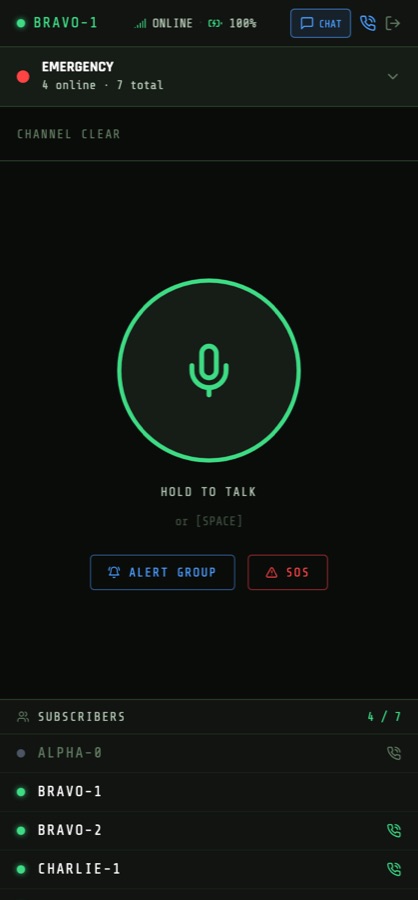
Your voice reaches the whole group instantly. No dialling, no waiting for anyone to pick up.
THE SITE SPEAKS
Temperature, leak and motion sensors raise alarms in the same channel where the shift works.
ONE SCREEN
The dispatcher sees who is on air, where they are and what the site is doing — all at once.
01 · VOICE
Four ways to reach someone
An ordinary radio does one thing: it talks to a channel. Real work needs more — sometimes one person, sometimes the entire shift, and sometimes at three in the morning.
GROUP CHANNEL
Hold the button, talk
Classic push-to-talk. Hold the key and the whole group hears you. One speaker holds the channel; everyone else sees who is on air.
That discipline is the point, not a limitation — unlike a conference call, three people never talk at once.
PRIVATE CALL
Full duplex, one to one
A private conversation with one person, exactly like a phone call — both sides talk at the same time.
The rest of the group neither hears it nor loses the channel.
GROUP ALERT
Get everyone, now
One button, and every member's phone rings for real — in a pocket, in a bag, on a night table, even with the app closed.
They answer and land straight on the channel.
EMERGENCY
SOS and dispatcher call
A separate panic button reaches the whole organisation, crossing group boundaries. A dispatcher call goes to whoever is on duty today.
Nothing suppresses SOS — not a schedule, not a group setting.
How a call reaches a phone in a pocket. The server does not send blindly: it knows the state of every subscriber and picks the channel. A sleeping phone is raised by a system call — the app can even be closed.
Distance is irrelevant. This is not a radio set with a coverage radius: everything runs through a server over ordinary internet. People in one group can sit in different cities and countries — on site, on a business trip, on another continent — and hear each other as if they stood together. All it needs is a connection: wired, Wi-Fi or cellular.
You can see who is reachable before you try. The system tells three states apart, so nobody wastes time calling a phone that is switched off.
ON AIR— hearing the channel right nowREACHABLE— asleep, but a call will wake itOFFLINE— phone is off
02 · DEVICES
Runs on what you already own
You do not need to buy a fleet of radios to start. The phones in your people's pockets are enough. And where a real radio is the right tool, it joins the same system.
Device
For
What it gives
Android phone
Field staff
A full radio in an app. Calls wake a sleeping phone; message notifications work.
iPhone
Field staff
The same. An incoming call raises the native call screen even on a locked phone.
Browser
Dispatcher, manager
A console on the desktop: map, shift roster, live channel, chats. Nothing to install.
Inrico T320 radio
Field, warehouse, site
A real radio with a hardware PTT key and D-pad. One-handed, works with gloves on.
PHONE
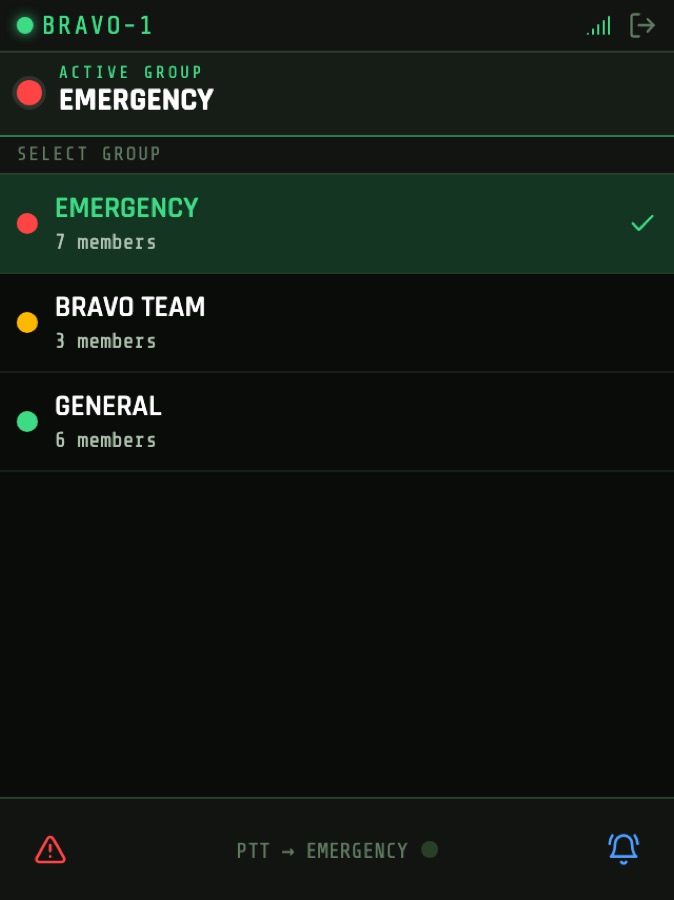
A large talk button, the list of groups and the shift roster showing who is on air.
T320 RADIO
A 240×320 screen built for one hand: the D-pad picks a channel, the hardware key talks.
MIXED FLEET
Everyone on one channel
A worker with a radio, a worker with a phone and a dispatcher at a desk sit in the same group and hear each other. No gateways, no adapters.
ONBOARDING
Join by QR code
Each person gets a printed card with a personal QR code. Scan it with the camera and you are on air — no login, no password, no hunting for the right group.
Cards print as a sheet or save as PDF to send in a messenger.
03 · SENSORS AND ALARMS
The site joins the channel
This is the part no ordinary radio does. A sensor is a subscriber like any other: when something goes wrong, it raises the alarm in the same channel where the shift is working.
CONNECTION
No hardware changes
The server polls the sensor over its normal interface. No firmware work — the equipment stays exactly as it is.
A device can also push readings itself, if that suits it better.
THRESHOLDS
Its own normal for each
Every sensor carries its own limits: a fridge between 2 and 8 degrees, a warehouse below 70% humidity.
Set a minimum, a maximum, or both.
NO SPAM
One alarm, once
The alarm fires when a value crosses the line, not every fifteen seconds for as long as the problem lasts.
Otherwise people get used to alarms and stop looking at them.
Why an alarm arrives once, not two hundred times. The server reads values continuously but raises a signal only at the moment one crosses the line. While the problem persists there are no repeat alarms — otherwise people get used to them and stop looking.
Three sensor states the dispatcher sees:
NORMAL— within limitsALARM— threshold crossedSILENT— no data for too long
"Silent" is an alarm of its own, and that matters. A sensor that stopped answering is more dangerous than one reporting bad numbers: a freezer may have been thawing for an hour while the screen still shows the last good temperature. The system treats missing data as reason enough to get people moving.
Where an alarm goes:
Channel
To whom
When it helps
Dispatcher console
The duty shift
The sensor card turns red on the shared screen instantly.
Phone push
The group the sensor belongs to
At night, on a weekend, when nobody is at the console.
Telegram
A manager, a contractor
People who need to know about incidents but not access to the system.
04 · DISPATCHER CONSOLE
Everything on one screen
The console is where the rest comes together: people, site and conversation. The dispatcher never switches tabs to understand the situation.
LIVE MAP
Where the shift is
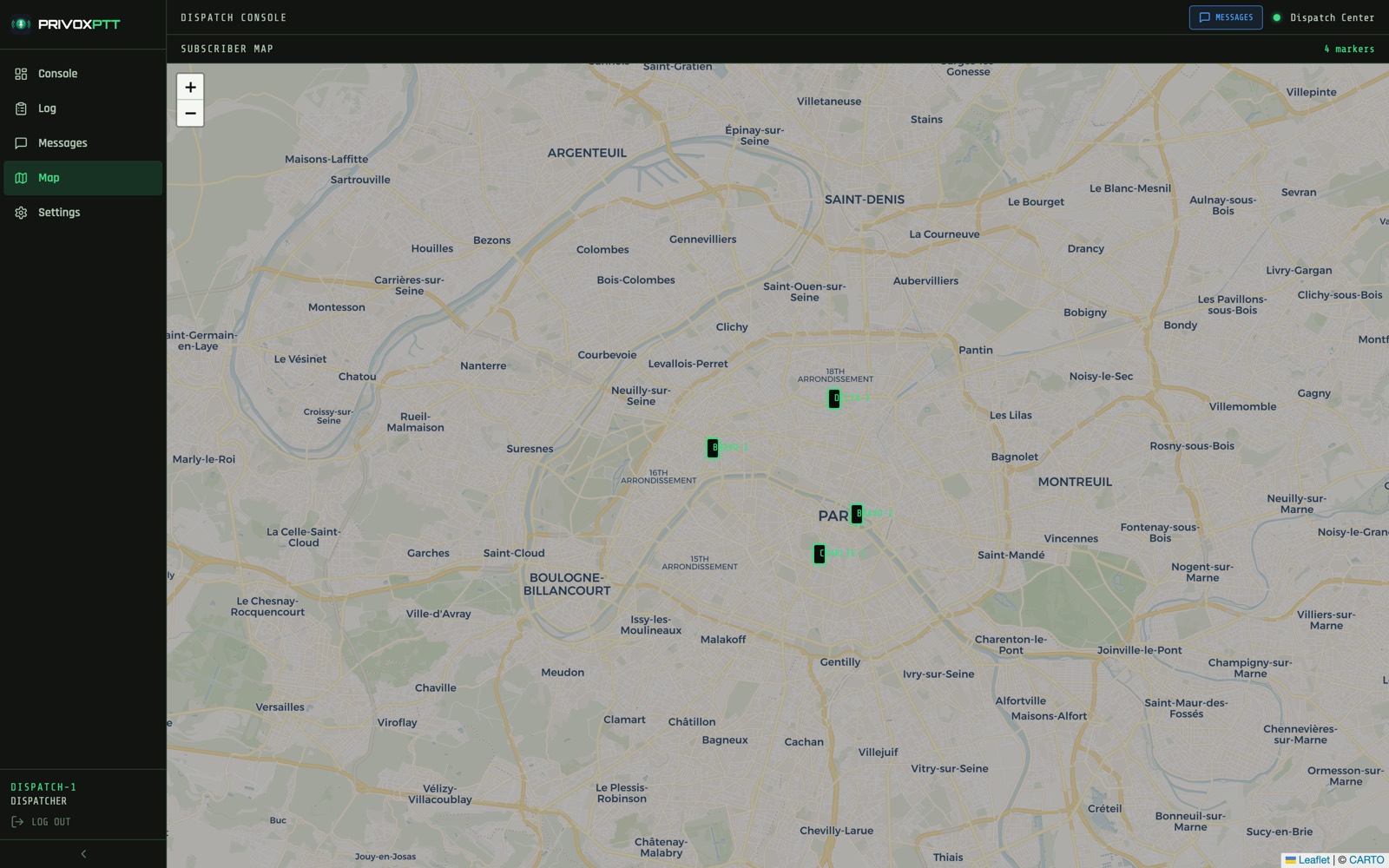
Subscriber markers update in real time as people move. The tooltip shows the callsign and current speed.
Speed matters more than it sounds: you can see whether a vehicle is driving or has been parked for twenty minutes. Sending the nearest person becomes a glance, not a round of phone calls.
CONSOLE
Groups, people and sensors side by side
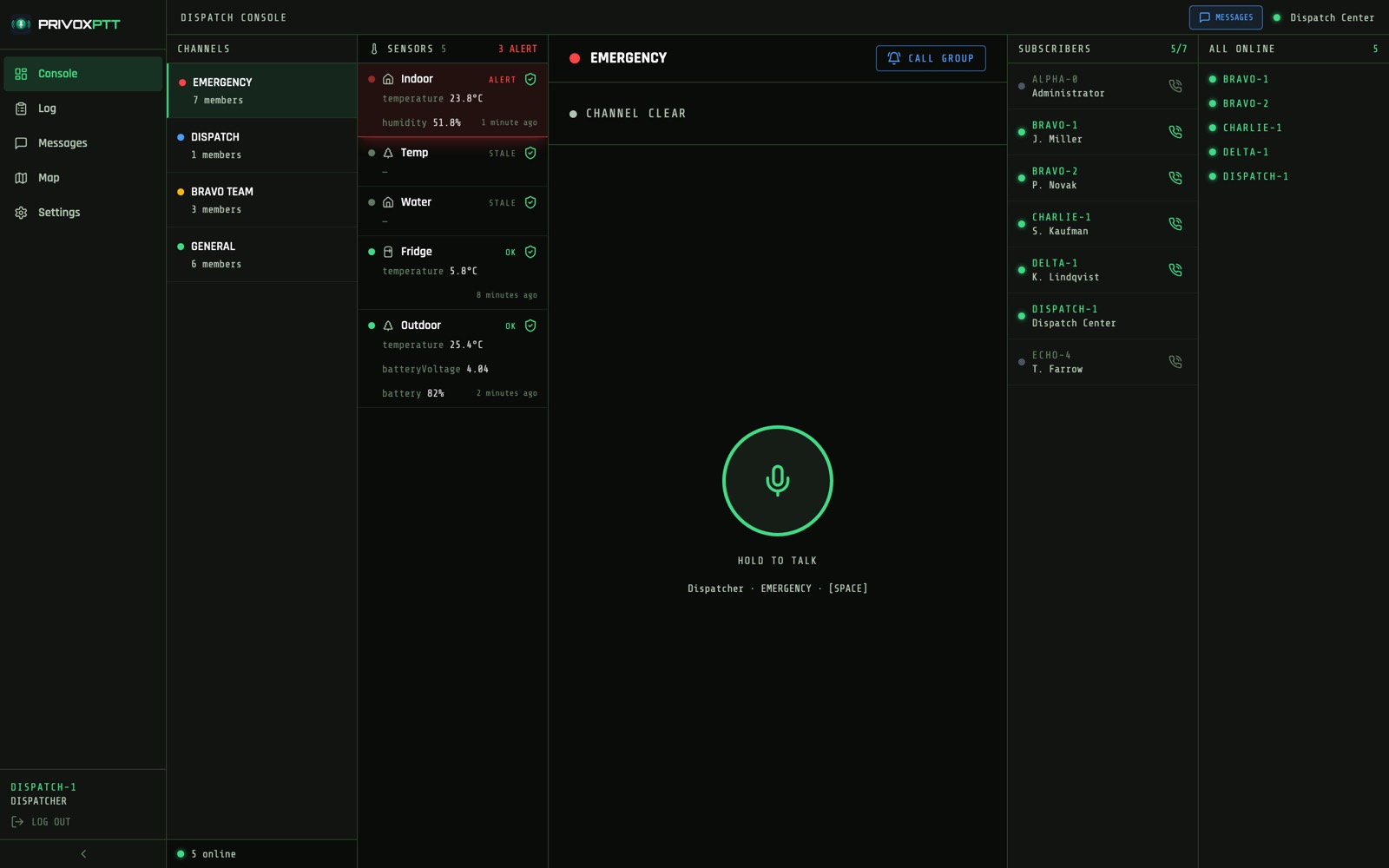
Channels on the left, the shift roster with reachability on the right, sensors in their own panel. An alarm turns red right there, without taking you off the screen.
The dispatcher can talk into any group without joining it.
LOG
Who was on air, and when
Sign-ons and sign-offs are recorded. Reviewing a shift afterwards — who was reachable when an incident happened — works the next day just as well.
MESSAGES
Chats in the same window
Group and private messages open next to the live channel. An address, a plate number or a photo of a fault does not get lost in a stream of voice.
The dispatcher console. Channels on the left, then the site's sensors — one in alarm, two silent — the live channel in the middle, and the shift on the right with reachability and a call button for each person.The shift on the map. Markers move with the people; the tooltip carries the callsign and current speed.
The map is a dispatch tool, not surveillance. Location sharing can be switched off for an individual — a contractor, or a driver in a private car. That permission is granted separately from the right to talk and to write.
05 · CONTROL
Who, where, and until when
Communication on a site is not only about being heard. It is also about who may speak, who sees other people's positions, and what happens to the access of someone who left last month.
ROLES
Four levels of access
A subscriber talks in their own groups. A dispatcher hears all of them and can talk into any. An administrator creates people and groups. The owner sees the whole system.
VALIDITY
A group for the duration of the job
A group can carry a start and end date. A shift, an event, a one-month contract — the channel closes itself when the time is up.
History stays readable: reviewing a shift after it ends is still possible.
PERMISSIONS
Different roles inside one group
A member can be allowed to listen but not speak, to write but not share a position. An observer, a trainee, a contractor — each gets what fits.
ACCOUNTS
Access with an expiry date
A seasonal worker gets access until a set date, and it lapses on its own. A lost device is cut off in one action, active sessions included.
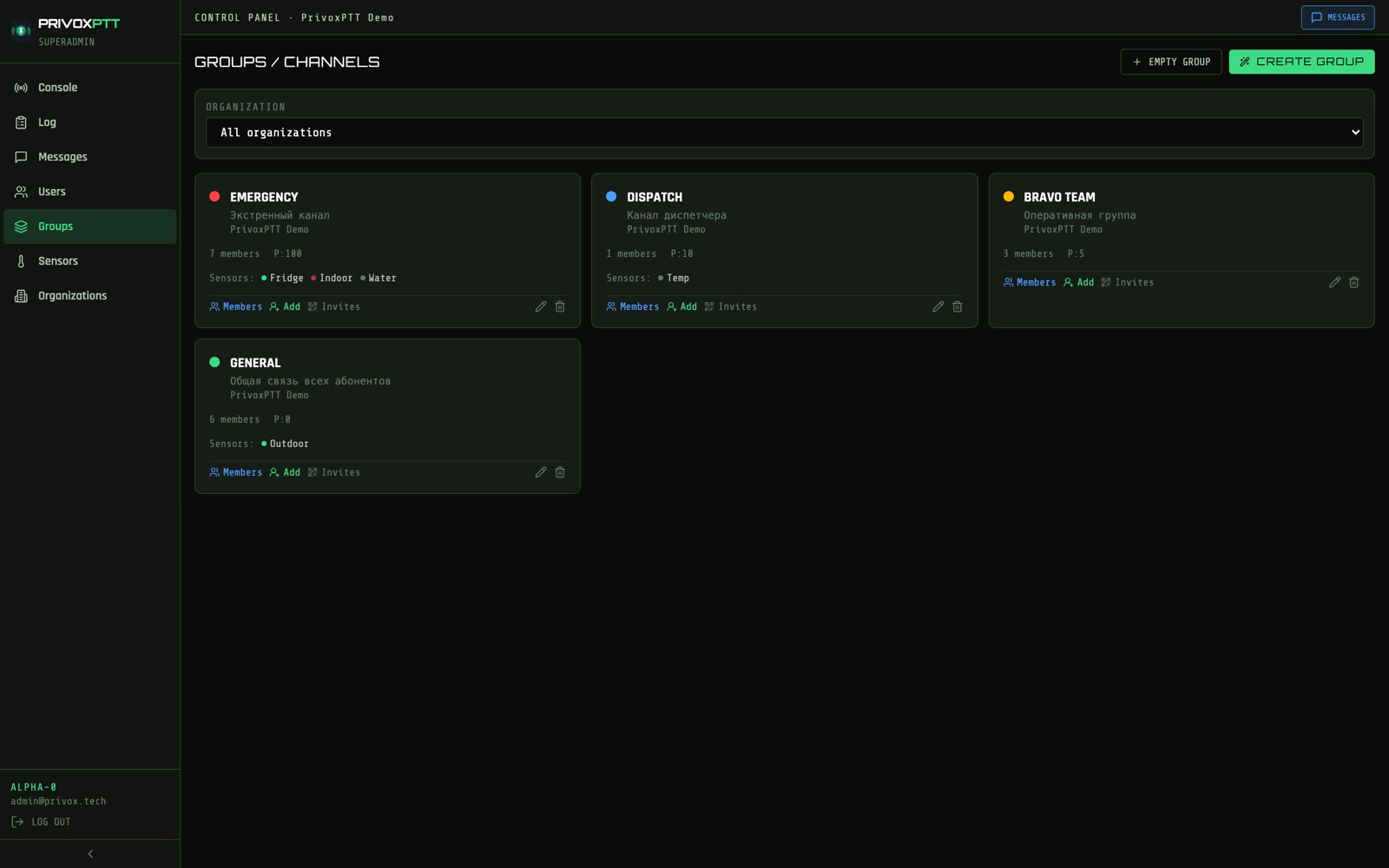
Group management: membership, validity dates, per-member permissions and invitation handling.
AUDIT
Who changed what
Administrator actions — creating people, issuing and revoking invitations — are recorded separately from the live channel.
MESSAGING
Chat where the voice is
Group and private chats, history on the server, photos and documents up to 25 MB, video up to 50 MB. You cannot read out a serial number over the air.
06 · WHO NEEDS THIS
Where it pays for itself
These situations share one thing: people need to reach each other fast, and the site needs to reach people fast. The more a minute of downtime or a missed alarm costs, the more obvious the return.
SECURITY
Guarding companies, in-house security
A shift on the ground, patrols, fixed posts. They need instant contact and a panic button you can find without looking.
SOS from any device, reaching the whole organisation
The dispatcher sees on the map who is nearest
Door and motion sensors raise alarms by themselves
RETAIL AND FOOD SERVICE
Store chains, restaurants, kitchens
Here the sensors pay off faster than the radio: one thawed cold room costs more than a year of running the system.
Cold room monitoring with alarms on any excursion
A night alarm wakes the person responsible instead of waiting for morning
Floor and kitchen staff on one channel
CONSTRUCTION AND INDUSTRY
Sites, workshops, warehouses
Noise, gloves, hard hats. You need a physical key and communication that works across the site without a conversation about tariffs.
Radios with a real button for people in the field
Site managers and the office on the same channel, from phones
Groups scoped to a contract close themselves
FACILITIES AND UTILITIES
Property management, maintenance
Emergency crews, addresses across town, night duty. Sensors in basements and server rooms warn you before the tenants call.
Leaks and flooding flagged before the water spreads
A photo of the fault straight into the chat from site
You can see which crew is closest to the incident
LOGISTICS AND TRANSPORT
Fleets, warehouses, delivery
Drivers on the road, pickers in the aisles, one dispatcher in touch with all of them.
Wake the entire shift with one button
Vehicle positions on the dispatcher's map
Reefer temperature under watch
EVENTS
Organisers, venues, festivals
Crew hired for two days, and communication has to work immediately with no training.
Join by QR: scan and you are on air
The group lives exactly as long as the event
Runs on personal phones — no radio fleet needed
A note on seasonal staff and contractors. They are usually where the problem starts: people are hired for a month, and their access stays forever. Here the expiry is set when the account is created, and it lapses on its own — with no reliance on anyone's memory or discipline.